
Choosing a sewer inspection camera is not as simple as looking for the highest resolution or the longest cable.
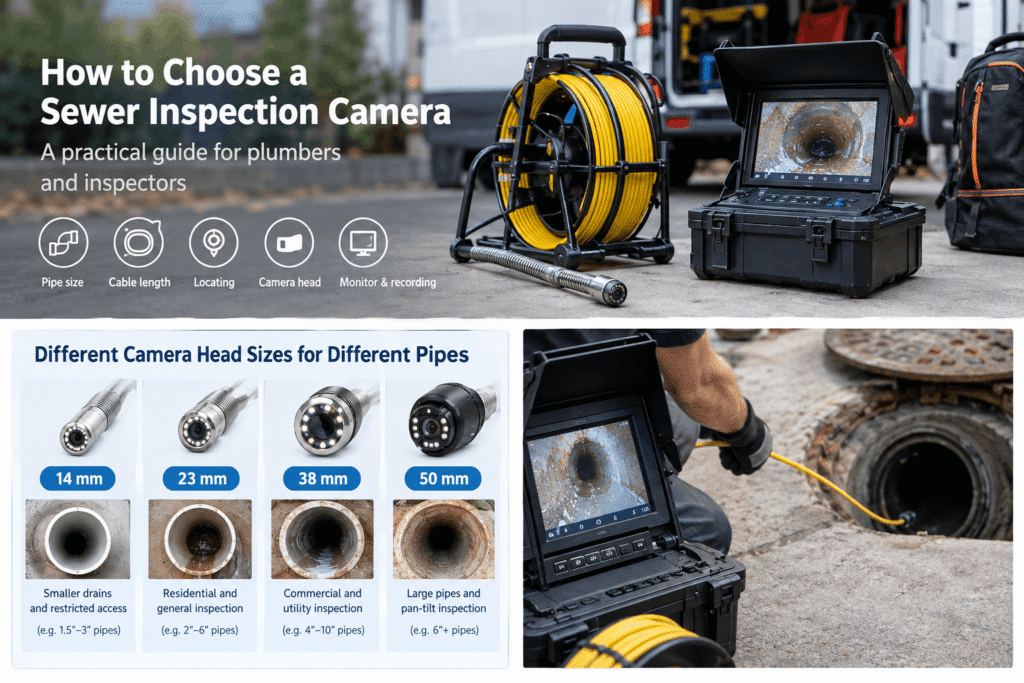
A camera that works well for a residential plumber may be completely wrong for a contractor inspecting large commercial lines. A smaller camera head may get through a tight drain, while a larger head may be a better choice when you need more robust equipment for larger pipes.
The same applies to cable length, locating capability, self-leveling, lighting, and recording.
The right sewer camera is the one that matches the work you actually do.
In this guide, we’ll walk through how to choose a sewer inspection camera based on pipe size, access conditions, inspection distance, job type, and the features that are genuinely useful in the field.
Start With the Job, Not the Camera
One of the easiest mistakes when buying inspection equipment is starting with the product specifications.
It’s tempting to compare cameras like this:
- 1080P vs. 720P
- 100m vs. 60m cable
- 23mm vs. 38mm camera head
- 10-inch vs. 13-inch monitor
But those numbers don’t tell you which camera is right for your work.
Start with five questions instead:
- What size pipes do you normally inspect?
- How far do you usually need to push the camera?
- How many bends and difficult access points do you encounter?
- Do you need to locate the camera underground?
- Are you mainly doing residential, commercial, or larger infrastructure work?
Once you answer those questions, the equipment choice becomes much easier.
Choose the Camera Head for Your Actual Pipe Sizes
Camera head diameter is one of the first things we would look at.
A head that is too large simply won’t get through a smaller pipe. But going as small as possible isn’t automatically better either.
The camera head has to work together with the push rod, lighting, pipe diameter, bends, and the type of inspection you’re doing.
For example, Inspection Gear Pro systems are available with 14mm, 23mm, and 38mm camera head configurations for different pipe applications.
A practical way to think about them is:
| Camera Head | Typical Application |
|---|---|
| 14mm | Smaller residential drains and restricted access |
| 23mm | Residential and general drain inspection |
| 38mm | Larger residential, commercial and utility applications |
| 50mm pan-and-tilt | Larger pipes and more advanced inspections |
These ranges should be treated as a starting point rather than a guarantee that a particular camera will navigate every pipe.
A pipe’s diameter is only part of the problem.
Bends matter. Access points matter. Pipe condition matters. Push-rod flexibility matters.
A camera that technically fits the pipe may still struggle when it reaches a sharp bend or a difficult transition.
A common mistake
Don’t choose the smallest camera simply because it has the smallest head.
If most of your work involves larger pipes, a larger inspection system may give you a more suitable combination of cable, push rod, lighting, and camera performance.
Related guide: [What Size Sewer Camera Do I Need?]
Don’t Automatically Buy the Longest Cable
This is another area where bigger isn’t necessarily better.
A 100m cable sounds impressive, but ask yourself how often you actually need to inspect 100m into a pipe.
For a plumber handling residential drain calls, a compact 20m, 30m or 40m system may be easier to transport and faster to deploy.
For more demanding inspection work, 40m or 60m may make more sense.
Longer systems, including 100m configurations, become more useful when you’re regularly working on larger commercial, stormwater or municipal lines.
The important question is:
What’s the longest inspection distance you regularly need—not the longest cable you can buy?
A longer push rod can also mean a larger reel, more weight and more cable to manage at the job site.
So our approach is simple:
Choose the cable around your normal workload, then leave some room for the occasional longer inspection.
Inspection Gear Pro systems cover different cable configurations, from shorter portable setups to systems capable of much longer inspections.
Related guide: [How Long Should a Sewer Camera Cable Be?]
Camera Resolution Matters, But It Isn’t the Whole Picture
You’ll see a lot of sewer cameras advertised as 1080P, and resolution is certainly worth considering.
But a number on a specification sheet doesn’t tell you what the image will look like inside a dirty, wet pipe.
The actual image depends on several things:
- Camera sensor
- Lens quality
- LED lighting
- Viewing angle
- Distance from the pipe wall
- Pipe condition
- Water and debris
- Monitor quality
This is why we don’t recommend choosing a sewer camera based on resolution alone.
A well-designed 1080P system with good lighting can be much more useful than a camera with a higher advertised resolution but poor illumination or an unsuitable lens.
For professional inspection work, the better question is:
Can I clearly see the defect I need to document?
That is more useful than simply asking how many pixels the camera has.
When Is Self-Leveling Worth Paying For?
Self-leveling is one of those features that may not seem important until you’ve used it.
Inside a pipe, the camera head can rotate as you push the cable. Without self-leveling, the image can turn sideways or upside down, making it harder to understand where a defect is located.
A self-leveling camera keeps the image orientation more consistent.
This can be particularly useful when you’re documenting:
- Cracks
- Root intrusion
- Damaged joints
- Corrosion
- Pipe wall defects
- Other structural problems
For someone doing an occasional basic inspection, self-leveling may not be essential.
For someone regularly producing inspection reports or showing customers exactly where a problem is located, it becomes much more useful.
Inspection Gear Pro’s 1080P systems include self-leveling configurations across several camera head sizes.
Related guide: [What Is a Self-Leveling Sewer Camera?]
Do You Actually Need a Sonde and Locator?
This is another feature that should be decided based on your workflow.
A sonde is a transmitter located near the camera head. A compatible locator can detect the sonde from above ground and help identify the camera’s underground position.
That changes what you can do with the camera.
Without locating capability, you can see a blockage or damaged section.
With locating capability, you can also help determine:
Where is that problem located?
For example, if the camera identifies a blockage 18 meters into the line, knowing the approximate underground position can be much more useful than simply knowing the cable distance.
A locating system can help when you need to:
- Mark the location of a blockage
- Identify where a damaged section is
- Estimate where excavation may be required
- Communicate the problem location to another contractor
- Document the position of an underground defect
Inspection Gear Pro offers systems with 512Hz sonde capability, including configurations with a built-in transmitter.
But there is an important distinction:
Not every inspection requires a locator.
If you’re simply checking a short residential drain and only need to see what’s inside the pipe, you may not need a locating system.
If locating the problem is part of your service, it becomes much more valuable.
Related guides:
[What Is a 512Hz Sonde?]
[Do I Need a Sewer Camera Locator?]
Think About Bendability Before Looking at Maximum Pipe Size
This is something that is easy to overlook when comparing product specifications.
A camera may be advertised for a certain pipe diameter, but that doesn’t mean it will effortlessly travel through every pipe of that size.
The actual inspection path can include:
- 45-degree bends
- 90-degree bends
- Multiple bends close together
- Pipe transitions
- Deposits
- Roots
- Deformed sections
- Different pipe materials
The combination of camera head + spring + push rod + pipe diameter determines how easily the system moves through the line.
So when you’re comparing two cameras, don’t just ask:
“What is the smallest pipe it can enter?”
Also ask:
“What kind of pipe path can it realistically navigate?”
That is a much more useful question for someone doing actual inspections.
When Does Pan & Tilt Make Sense?
A standard push camera is designed primarily to move forward and show you what’s in front of the camera.
A pan-and-tilt system gives you another level of control.
For larger inspection applications, being able to change the viewing direction can make it easier to inspect pipe walls, connections and specific areas of interest.
Inspection Gear Pro’s larger rotating camera system uses a 50mm camera head with 360° continuous pan and 180° tilt, with 60m and 100m cable options.
That’s a very different type of equipment from a compact residential drain camera.
So don’t pay for pan-and-tilt just because it sounds more professional.
If your normal work is small residential drains, a compact push camera may be the more practical tool.
If you’re working on larger commercial lines, stormwater systems or municipal applications, the additional control can become much more useful.
Related guide: [What Is a Pan & Tilt Sewer Camera?]
Don’t Forget the Monitor and Recording System
The camera head gets most of the attention, but the monitor is what you actually look at during the inspection.
For professional work, a usable monitor and reliable recording system can make a big difference.
Recording is particularly useful for:
- Customer reports
- Before-and-after documentation
- Repair verification
- Insurance or property records
- Training
- Reviewing a difficult inspection later
It also changes the customer conversation.
Instead of telling a customer:
“There’s a damaged section in the pipe.”
You can show them exactly what the camera sees.
That’s often much easier.
Inspection Gear Pro systems are available with monitors ranging from compact displays to larger 13-inch-class monitors, depending on the system.
Some systems also support SD/USB recording, audio and other documentation functions.
Waterproofing: Look at the Actual Specification
Sewer cameras work in environments where water and contamination are unavoidable.
That’s why waterproofing is important.
But there’s an easy mistake here:
Don’t assume that an IP68 camera head means every component of the entire system is waterproof to the same level.
When comparing equipment, look at what the manufacturer actually specifies.
For example, several Inspection Gear Pro camera systems specify an IP68 camera head with protection up to 20m continuous submersion under the stated conditions.
The important thing is to understand what the rating applies to rather than treating “IP68” as a blanket rating for the entire system.
Match the Camera to the Work You Actually Do
After looking at the individual features, this is where the decision becomes much easier.
Residential Plumber
If most of your work involves residential drains, portability and maneuverability may matter more than maximum cable length.
A practical setup may prioritize:
- 14mm or 23mm camera head
- 20–40m cable
- Good lighting
- 1080P imaging
- Self-leveling
- Recording
- Optional locating capability
You probably don’t need the largest reel in the catalog.
Drain Cleaning Company
If you’re using the camera frequently throughout the week, durability and workflow become more important.
You may want:
- 23mm or 38mm camera head
- 40–60m cable
- Self-leveling
- 1080P
- 512Hz sonde
- Recording
- Replaceable components
- Easy transport and setup
For frequent field work, serviceability matters almost as much as the original specification.
Home Inspector
A home inspector often needs to balance capability with portability.
You may not need a huge commercial system if most inspections involve residential properties.
Useful features can include:
- Compact design
- Suitable camera head
- Enough cable for residential inspection
- Good image quality
- Recording
- Easy-to-carry equipment
The goal is not to buy the most powerful system.
It’s to have the right system available when a sewer line becomes part of the inspection.
Commercial and Municipal Inspection
This is where equipment requirements can change significantly.
Larger pipes and longer inspection distances may justify:
- 38mm or larger camera systems
- 60–100m cable configurations
- Larger push rods
- 512Hz locating capability
- Larger monitors
- Recording
- Pan-and-tilt functionality
For larger pipes, Inspection Gear Pro offers systems ranging from 38mm inspection cameras to a 50mm pan-and-tilt system.
Three Sewer Camera Setups We Would Consider
Rather than choosing equipment from a list of specifications, it can be useful to think in terms of actual jobs.
Setup A — Residential Drain Work
Typical requirement:
- Small to medium pipe sizes
- Short to medium inspection distances
- Frequent transportation
- Fast setup
Priorities:
14/23mm → 20–40m → portable → recording
A compact system is usually easier to live with when you’re moving between residential jobs all day.
Setup B — Professional Drain Inspection
Typical requirement:
- Wider range of pipe sizes
- More frequent inspections
- Longer inspection distances
- Need to document defects
Priorities:
23/38mm → 40–60m → 1080P → self-leveling → 512Hz sonde
This is where a more capable inspection system starts to make sense.
Setup C — Commercial / Larger Pipe Inspection
Typical requirement:
- Larger pipe diameter
- Longer inspection distances
- More complex pipe conditions
- Need for directional control
Priorities:
38/50mm → 60–100m → locating → recording → pan & tilt
At this point, you’re no longer looking for a compact residential drain camera. You’re choosing a professional inspection system for a different class of work.
Six Buying Mistakes We Would Avoid
Mistake 1: Buying the Longest Cable
100m isn’t automatically better.
If you rarely inspect beyond 30–40m, the extra cable may simply make the equipment larger and harder to handle.
Mistake 2: Choosing the Smallest Camera Head for Everything
A smaller head can help with restricted access, but it isn’t automatically the best option for larger pipes.
Choose around your actual workload.
Mistake 3: Comparing Cameras by Resolution Alone
1080P is useful, but lighting, sensor, lens and image processing all affect what you actually see.
Mistake 4: Buying a Sonde Without Thinking About the Locating Workflow
A sonde is only useful for locating when you have a compatible locator and know how the locating process works.
Think about the complete system, not one specification.
Mistake 5: Ignoring the Push Rod
The camera head isn’t working alone.
Push-rod stiffness, flexibility and handling can have a major effect on whether you can get the camera where you need it to go.
Mistake 6: Buying Based Only on the Initial Price
For professional users, the purchase price is only one part of the cost.
Also consider:
- Spare parts
- Battery replacement
- Cable maintenance
- Camera head replacement
- Repairability
- Warranty
- Long-term usability
A camera that is easy to repair and keep in service can be more valuable than one that is simply cheaper on day one.
Inspection Gear Pro Sewer Inspection Cameras
At Inspection Gear Pro, we don’t think there is one sewer camera that is right for every inspection.
Our current range covers different inspection requirements, from compact residential systems to larger commercial and pan-and-tilt equipment.
Depending on the model, configurations include:
- 14mm, 23mm and 38mm camera heads
- 50mm pan-and-tilt camera
- True 1080P imaging
- Self-leveling
- Built-in or optional 512Hz sonde
- 20m–100m cable configurations depending on the system
- Recording
- IP68 camera heads
- Portable and trolley-style systems
For example, a residential plumber may have very different requirements from a contractor inspecting commercial or municipal lines.
That’s why we recommend choosing the application first and the camera second.
Explore commercial sewer camera inspection.
Frequently Asked Questions
What size sewer camera should I buy?
Start with the smallest and largest pipe sizes you regularly inspect. Then consider bends, access openings and inspection distance. Inspection Gear Pro offers 14mm, 23mm and 38mm camera configurations for different applications.
Is a 100m sewer camera better than a 40m camera?
Not necessarily. A longer cable gives you more inspection distance, but it can also mean a larger and heavier system. Choose based on the distances you actually encounter.
Do I need a 512Hz sonde?
Not for every inspection. If you need to locate the camera or a defect from above ground, a sonde and compatible locator can be very useful.
Is self-leveling worth it on a sewer camera?
For basic visual inspections, it may not be essential. For professional inspections and defect documentation, keeping the image orientation consistent can make the inspection easier to interpret.
Can a sewer camera go around a 90-degree bend?
It depends on the pipe diameter, bend radius, camera head, push rod, pipe condition and the configuration of the system. A camera that fits the pipe may still have difficulty navigating a particular bend.
What is better, a sewer camera or a borescope?
They are designed for different jobs. A borescope is useful for shorter, more confined inspections, while a sewer inspection camera is designed around a push rod and longer pipe inspection.
Do I need a pan-and-tilt sewer camera?
Probably not if you’re mainly inspecting small residential drains. Pan-and-tilt becomes more useful as pipe size, inspection complexity and the need to inspect different directions increase.
What should I do if the camera gets stuck?
Don’t keep forcing the push rod. Stop and assess where the camera is, what may be blocking it, and whether the cable is under excessive tension. Forcing the cable can damage the push rod or camera head.
Final Takeaway
There is no “best” sewer inspection camera for every plumber.
The better question is:
What camera setup makes the most sense for the work I do every week?
Start with your pipe sizes.
Then consider your typical inspection distance.
After that, look at bends, locating requirements, self-leveling, image quality, recording and portability.
If you’re mainly doing residential drain work, a compact camera may be the better tool.
If you’re regularly inspecting larger commercial lines, you’ll probably need a more capable system.
And if you’re working with large pipes, long inspection distances and complex infrastructure, that’s where larger systems and pan-and-tilt cameras start to make sense.
Choose the job first. Choose the camera second.